

Here’s an updated version of the introduction:
In the digital age, where visuals play a central role in storytelling and communication, the ability to create images from words has become a powerful tool. MidJourney, an AI platform, brings this capability to life, allowing users to transform text into compelling visuals. Before we dive in – this article assumes that you have Discord and Midjourney set up. Click the following links if you need help with Discord/Midjourney setup or connecting Midjourney to your private server.
Introduction to Midjourney
Overview of MidJourney and its Capabilities
What is MidJourney?
MidJourney is an innovative AI-driven platform that specializes in generating images based on text prompts. It’s not just about creating a visual representation; it’s about capturing the essence, emotion, and context of the words provided.
Capabilities of MidJourney:
-
Versatility: Whether you’re looking for a serene landscape, a complex sci-fi scene, or a detailed character portrait, MidJourney is equipped to handle a wide range of requests.
-
Adaptability: The platform can produce images that range from abstract art to realistic portrayals, depending on the specificity and style of the prompt.
-
Interactivity: Users can refine, iterate, and evolve their images by tweaking their prompts, allowing for a dynamic and interactive creation process. Midjourney also allows for an expansion of the original image, modifying the aspect ratio, as well as inpainting.
The Art and Science of Crafting Prompts
While MidJourney’s capabilities are undeniably impressive, the quality of the generated image is intrinsically tied to the quality of the prompt provided. Here’s why effective prompting is crucial:
-
Precision and Clarity: A well-crafted prompt acts as a clear directive for the AI. It eliminates ambiguity and ensures that the generated image aligns closely with the user’s vision.
-
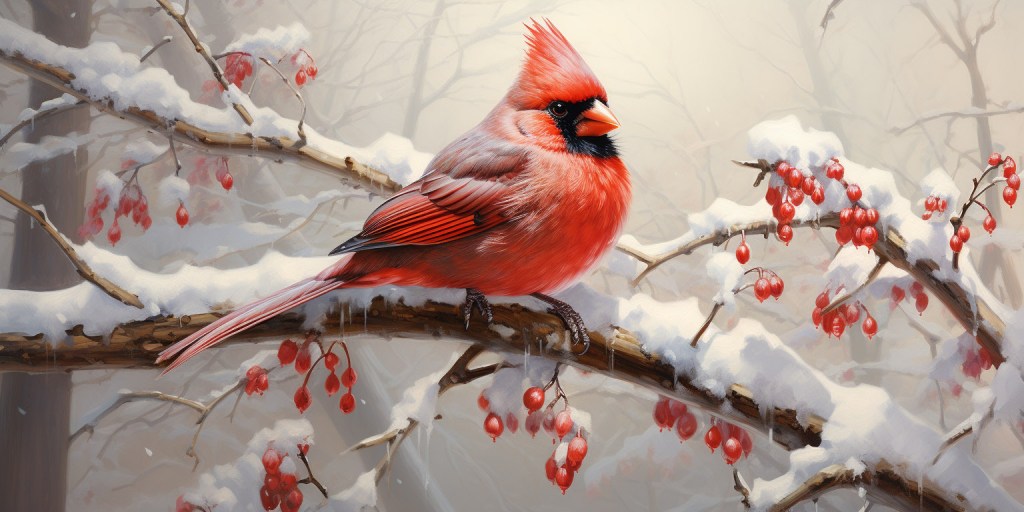
Richness of Detail: A descriptive prompt can lead to a richer, more detailed image. For instance, “a bird” might produce a generic avian image, but “a crimson cardinal perched on a snow-covered branch” paints a vivid winter scene.
-
Contextual Cohesiveness: Providing context ensures that the AI understands the setting, mood, and relationships between different elements, leading to a more cohesive and meaningful image.
-
Unlocking Potential: Effective prompts allow users to tap into the full potential of MidJourney, pushing the boundaries of what the AI can achieve and producing awe-inspiring visuals.
MidJourney is not just a tool; it’s a canvas where words become visuals, and imagination takes tangible form. However, like any masterpiece, individual brushstrokes matter. In the world of AI-driven image generation, these brushstrokes are the prompts we provide. By understanding and mastering the art of effective prompting, we can truly harness the magic of MidJourney, creating visuals that captivate, inspire, and resonate.
Tips for Writing Effective Prompts
Be Descriptive
In the realm of AI-driven image generation, the phrase “garbage in, garbage out” holds true. The quality of the output is directly proportional to the quality of the input. For platforms like MidJourney, this input comes in the form of prompts. Being descriptive in these prompts is not just a recommendation; it’s a necessity. Let’s delve into why context and examples are crucial when crafting these prompts.
The Power of Descriptiveness
-
Precision: A vague prompt can lead the AI in multiple directions, resulting in an image that might not align with the user’s vision. Being descriptive narrows down the possibilities and guides the AI towards the desired outcome.
-
Richness of Detail: A detailed prompt can lead to a richer, more intricate image. For instance, “a cat” might generate a simple image of a feline, but “a fluffy Persian cat lounging on a sunlit windowsill with a blue collar” paints a more vivid picture.
Why Context Matters
-
Understanding the Scene: Context provides the AI with a backdrop, setting the stage for the main elements of the image. For example, “a knight” could be anywhere, doing anything. But “a knight defending a stone bridge in a dense forest from an approaching troll” provides a clear scenario.
-
Avoiding Ambiguity: Many words have multiple meanings. Without context, the AI might not choose the interpretation you intended. For instance, “bat” could mean the mammal or the sports equipment. Specifying “a bat flying against a moonlit sky” ensures the AI understands you’re referring to the creature.
-
Enhancing Relevance: Context ensures that all elements in the generated image are cohesive and relevant to each other. “A surfer, a snowy mountain, and a campfire” might seem disjointed, but “a surfer sitting by a campfire, sharing tales of riding waves, with a dreamy backdrop of a snowy mountain” ties them together in a narrative.
Use Specific Language
In the realm of AI-driven platforms like MidJourney, where text prompts are transformed into visual masterpieces, the adage “words have power” takes on a literal meaning. The choice of words, their specificity, and nuance can dramatically influence the outcome. This article delves into the pivotal role of specific language in AI image generation and underscores the significance of deliberate word choice.
The Weight of Words
Why Specificity Matters:
Every word in a prompt serves as a directive for the AI. Vague or generic terms can lead the AI down a myriad of potential paths, often resulting in images that may not align with the user’s vision. Specific language, on the other hand, narrows down these paths, guiding the AI towards a more accurate representation.
The Nuance of Synonyms:
Consider the words “house,” “mansion,” and “cottage.” While all three refer to dwellings, each conjures a distinct image. A “sprawling mansion with ivy-covered walls” paints a vastly different picture than a “cozy cottage nestled in the woods.” These nuances highlight the importance of precise word choice.
Crafting with Care: The Art of Word Choice
-
Descriptive Adjectives: Adjectives breathe life into prompts. Instead of “a dog,” “a golden retriever with a shiny coat” provides a clearer image. The more descriptive the adjective, the more detailed the resulting image.
-
Active Words: Verbs can set the scene. “A cat sleeping” versus “a cat prowling” not only changes the cat’s activity but also the mood of the entire image.
-
Specific Nouns: General nouns can be ambiguous. “Vehicle” could mean a car, a bike, or a truck. Specifying “a vintage convertible” leaves little room for misinterpretation.
-
Contextual Modifiers: Adding context can refine the image further. “A knight” is generic, but “a knight from the medieval era with a weathered shield” offers historical and detailed context.
The Ripple Effect of Word Choice
A single change in word choice can create a ripple effect in the generated image. For instance, replacing “sunset” with “dawn” not only changes the time of day but also the color palette, shadows, and overall mood of the scene. Such is the power of specific language.
Technical and Genre-Specific Wording in AI Image Generation
Technical Terminology:
In specialized fields like architecture, engineering, or medicine, the use of precise technical terms is paramount. The same is true for AI image generation. A generic term might lead to broad interpretations, while specific technical wording ensures accuracy and relevance. For instance, a prompt with “bridge” might produce a basic footbridge, but “suspension bridge with steel cables” aligns with an engineering context, ensuring the image adheres to a more technical, modern look and captures intricate details.
Genre-Specific Language:
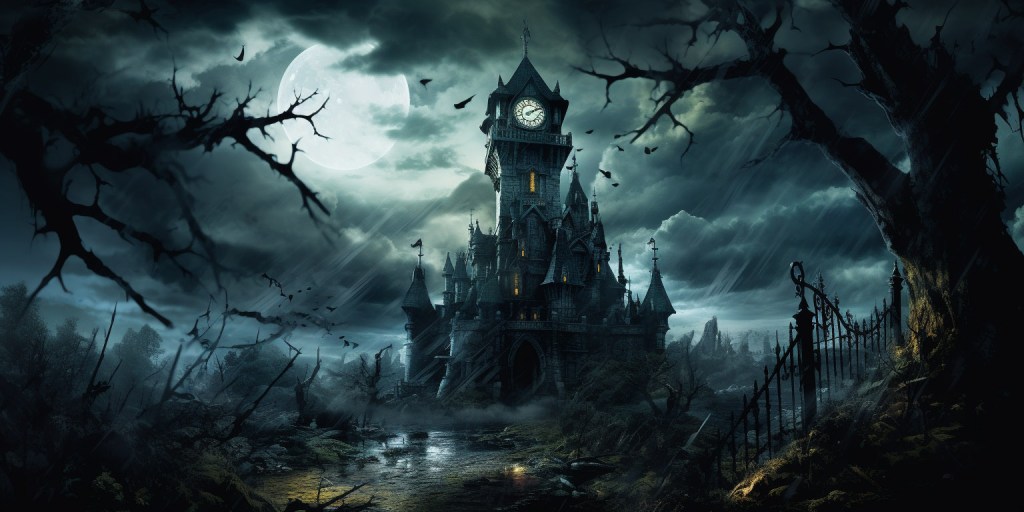
Every genre, whether in literature, film, or art, carries its own set of conventions and stylistic elements. Specifying genre in AI prompts can guide the generation process to produce images that resonate with these conventions. For example, “a castle” could be interpreted in numerous ways, but “a gothic castle on a stormy night” evokes a horror or dark fantasy setting. Utilizing genre-specific terms allows for the creation of visuals that capture the essence and mood of a particular genre, ensuring contextually appropriate and evocative imagery.
At the end of the day, Midjourney simply cannot interpret an endless amount of text in a single prompt. There are space limitations to consider. By utilizing technical and genre-specific language, you can make the most use of limited space. Instead of using all of your space to describe the look you want, utilize technical and genre-specific terms that point Midjourney in a particular direction. This way you can conserve space to describe the main subject or other important details.
Prompt Weighting
In AI-driven image generation, the precision of the output often hinges on the clarity and emphasis of the input. One of the nuanced tools at the disposal of users is “prompt weighting,” a mechanism that allows for emphasis of a section within a prompt.
The Essence of Prompt Weighting
Defining Prompt Weighting:
At its core, prompt weighting is the practice of assigning varying degrees of importance to distinct parts of a prompt (text or image). By manipulating these weights, users can subtly guide the AI, signaling which elements of the prompt should dominate the resulting image.
The Rationale Behind Weighting:
Consider a scenario where the prompt reads, “a bustling market with a calm river beside it.” Without any weighting, the AI might render both the market and the river with equal prominence. However, if the intent is to foreground the market’s vibrancy while keeping the river as a tranquil backdrop, prompt weighting becomes invaluable. By emphasizing “bustling market,” the AI’s focus can be channeled more towards that aspect (Example: /imagine prompt: a bustling market::3 with a calm river beside it::2).
Effective Utilization of Prompt Weighting
-
Clarity of Vision: Before attempting prompt weighting, have a clear vision of the image’s desired outcome. Which elements do you want to stand out? Which should play a supporting role?
-
Start Simply: Don’t start with a 6-part prompt. Start with 2 parts and see if you can achieve your goals. Most things can be achieved by dividing your prompt into 2 parts: subject and style. The subject which, is usually most emphasized, contains the most important description of the person/object. The style part adds to and embellishes the subject. If you do end up needing more than 2 parts to your prompt, introduce them gradually. To keep track of the weights, think of each weight as representing a percentage of the whole. In this example (
/imagine prompt:a bustling market::3 with a calm river beside it::2) the bustling market represents %60 of the whole while the calm river represents %40. If you wanted the river present but barely emphasized, you might use weights of 4:1 for the market and river respectively. -
Gradual Adjustments: Weighting is a tool of finesse. Start with subtle weight adjustments and observe the changes in the generated images. Overemphasis on one component might diminish or eliminate others. One thing to remember there is no limit to the numbers you can use. In earlier versions you were restricted to integers. But in version 5 and up (v 5.2 at the time of writing) you can use decimals. Integers might be easier to keep track of however!
-
Iterative Approach: The art of prompt weighting benefits from iteration. Generate images with different weight configurations to discern which aligns best with your envisioned outcome.
-
Synergy with Descriptiveness: While weighting steers the AI’s focus, the clarity of each prompt component remains crucial. Ensure that each part of the prompt, whether emphasized or not, is described with precision and supports the other. If the parts clash (unintentionally) you are likely to end up with a poor result.
-
Image Weighting: Beyond the text prompts, another layer of refinement in AI image generation is “image weighting.” For instance, if a user provides a reference image alongside a text prompt, image weighting can determine how dominant the reference’s influence will be in the final output. Whether it’s emphasizing the color palette from a reference image or the style of a particular artwork, image weighting offers a granular control, ensuring that the AI’s creative output harmoniously blends both text and image cues to achieve a cohesive and desired result. A version 5.2 update allows users to assign weights to images just as if they were part of the text prompt. Previously one needed to use a separate image weight command (–iw ) that had a range of .25 – 2. (Example:
/imagine prompt:market.jpg::2 a bustling market::2 with a calm river beside it:: ). In this example market has a weight of 2, but a double colon (::) with nothing following is equivalent to a weight of 1. More on using images later!
Specify Style
With AI-driven image generation, the ability to dictate the style or mood of the resulting image is akin to an artist choosing a particular brush or color palette. It’s not just about what the image depicts, but how it’s presented. This section delves into the art of specifying style, offering insights into how users can effectively guide the aesthetic and emotional tone of AI-generated visuals.
The Multifaceted Nature of Style
Defining Style in Imagery:
Style in the context of image generation encompasses a range of elements, from artistic techniques and color schemes to the emotional ambiance and thematic undertones. It’s the difference between a scene being rendered in the vibrant strokes of impressionism versus the stark contrasts of noir.
Mood as a Subset of Style:
While style pertains to the overall aesthetic, mood zooms in on the emotional atmosphere of the image. It’s the difference between a landscape bathed in the golden hues of dawn versus the same scene under a melancholic, overcast sky.
Techniques to Specify Style and Mood
-
Direct Style References: One of the most straightforward methods is to directly name the desired style. For instance, “a cityscape in the style of Van Gogh” would guide the AI towards the swirling, vivid patterns characteristic of the artist.
-
Descriptive Adjectives: Using adjectives can hint at the mood or style. Words like “dreamy,” “surreal,” or “gothic” can provide clear stylistic directions.
-
Reference Images: Providing an example image that embodies the desired style or mood can be immensely helpful. The AI can draw inspiration from the reference, aligning its output with the given visual cues.
-
Color and Tone Descriptions: Specifying desired colors or tones can influence both style and mood. For instance, “a forest scene with muted, autumnal colors” not only dictates the color palette but also evokes a certain nostalgic mood.
-
Historical or Cultural Context: Mentioning a specific era or cultural backdrop can guide the style. “A portrait in the style of Renaissance Italy” or “a scene reminiscent of 1980s Tokyo” can provide clear stylistic frameworks.
-
Prompt Weighting for style: The idea here is to use prompt weighting to modify our main subject. Here is an example (
/imagine prompt:a highway through a futuristic city::4 reflections, Bauhaus design, neon::). Our subject is a highway through a futuristic city, the second part adds stylistic elements. The style here is relatively subtle. But if we increased the style weight to 3, the influences become very strong and could start to conflict with the main subject.
Negative Prompts
In AI image generation, the power of suggestion is not limited to what you want to include, but also what you wish to exclude. Just as artists might choose to leave parts of their canvas untouched to achieve a desired effect, users can employ negative prompts to guide AI in omitting specific elements. This section explores the concept of negative prompts, highlighting their significance and offering strategies for their effective use.
Understanding Negative Prompts
What are Negative Prompts?
Negative prompts are directives given to the AI to specifically exclude or avoid certain elements or themes in the generated image. They act as boundaries or filters, ensuring that the final visual output avoids undesired components.
Why Use Negative Prompts?
At times, it’s not enough to specify what you want; it’s equally crucial to clarify what you don’t want. Whether it’s to avoid potential clichés, sidestep sensitive topics, or simply achieve a minimalist aesthetic, negative prompts offer a layer of control in shaping the image’s content.
Strategies for Effective Exclusion
-
Use of the
--noparameter: The simplest way to avoid/remove elements in your images is to use the--noparameter. At the end of your prompt just add--noand the concept you wish to remove (Example:/imagine prompt:cloudy blue sky--nobirds). Use commas to specify multiple concepts with one –no parameter. You may use this parameter only to find that you still see the unwanted element. That’s because the--noparameter is not an absolute; it is a negative prompt weight. It represents a prompt weight of ::-.5. If you want to stress to Midjourney more strongly that you don’t want an element, try using negative prompt weights manually. -
Use of negative prompt weights: To use negative prompt weights manually, you treat the undesired elements like part of your regular prompt. The difference is that you will give them a negative prompt weight instead of a positive one. One thing to note here is that the sum of the prompt weights must be positive. The negative part(s) of the prompt cannot be greater in sum than the positive ones (Example:
/imagine prompt:blue sky::4 clouds birds::-3--noplanes). In the previous example blue sky has a weight of 4, while clouds and birds have a weight of -3. Planes on the other hand has a weight of -.5 due to the use of the--noparameter. The prompt overall is still positive by a margin of .5.

Image Prompts
Text prompts are the traditional method of guiding the AI’s creative process. However, as the adage goes, “A picture is worth a thousand words.” Image prompts introduce a new dimension to this creative dance, allowing users to provide visual cues alongside or in place of text descriptions.
The Power of Visual Guidance
What are Image Prompts?
Image prompts are visual references provided to the AI to guide or influence the generation of a new image. Instead of, or in addition to, describing a scene or concept in words, users can provide an existing image to serve as inspiration or a baseline. To begin image prompting, simply provide a link to an online image at the beginning of your prompt Example: (/imagine prompt: AMLimage.jpg a highway through a futuristic city).
Why Use Image Prompts?
Visual cues can often convey nuances, styles, and details that might be cumbersome or challenging to describe with text. Whether it’s interior decorating from a photograph or the intricate patterns in a piece of artwork, image prompts allow for a more direct and precise form of communication with the AI.
Effective Strategies for Using Image Prompts
-
Complement with Text: While an image can convey a lot, complementing it with a text description can provide clarity. For instance, providing a picture of a sunset along with the text “winter setting” gives the AI a clear directive.
-
Focus on Key Elements: If you’re using an image prompt to highlight a specific element, ensure that the element is prominent in the reference image. For example, if you’re interested in a particular art style, choose a reference image that exemplifies that style.
-
Iterative Approach: Start with an image prompt and see how the AI interprets it. Based on the output, you can refine your prompt, possibly adding text descriptions or using a different reference image to guide the AI closer to your desired outcome. If the first generated image isn’t quite right, you can also use it as an example, using your word prompts to make changes to the picture, refining the result with each iteration.
-
Image weight: Using image weights can increase or decrease the importance of an image in your prompt. There are two ways to do this. The traditional method is to use the image weight parameter (
--iw), which ranges from .25 to 2 in version 5) The other method is to use normal prompting as you would if you were weighting text (this is a newer feature that has been added since v 5.2). Example (/imagine prompt:AMLimage.jpg::3 a highway through a futuristic city::2).
Leveraging ChatGPT
AI platforms like ChatGPT have revolutionized the way we interact, learn, and create. Beyond mere conversation it can be very helpful in image generation, particularly in crafting effective prompts. This section explores the synergy between ChatGPT and prompt creation, highlighting how users can harness this AI tool to refine and enhance their image generation process.
The Potential of ChatGPT in Prompt Crafting
Understanding ChatGPT:
ChatGPT, developed by OpenAI, is a state-of-the-art conversational AI model. While its primary function is to engage in human-like text conversations, its vast knowledge base and linguistic prowess make it an invaluable tool in various creative processes, including prompt crafting.
Why Use ChatGPT for Prompt Creation?
Crafting a prompt that accurately conveys a vision can be challenging. ChatGPT, with its ability to understand context, can provide suggestions, iterate based on feedback, and assist users in refining their prompts to achieve desired outcomes.
Strategies for Harnessing ChatGPT in Prompt Creation
-
Clarification and Refinement: Unsure about how to phrase your prompt? Pose your initial idea to ChatGPT and let it help you refine and clarify your wording, ensuring precision and effectiveness.
-
Exploring Variations: ChatGPT can provide multiple variations of a prompt, allowing users to explore different angles or nuances that they might not have considered.
-
Feedback Loop: After generating an image using a prompt, users can discuss the outcome with ChatGPT, seeking suggestions for prompt modifications to better align with their vision in subsequent attempts.
-
Learning from Examples: ChatGPT works well when provided an example of a prompt, it can then create variations of that prompt.
How to Use Chat GPT to Generate Images…Practically
As wonderful as Chat GPT is, simply asking for a prompt to create an image does not return the best result. The best results always come from establishing a framework. One method is to show an example of a good prompt, then instruct Chat GPT to create another prompt like the example with a different subject/style etc. Another method is to provide a formula of sorts that includes variables. You can instruct Chat GPT to fill in those variables according to your wishes. This can be a complicated method, resulting in a very long initial prompt for Chat GPT, but the outcomes are amazing. Here is a link to the method.
Conclusion
Crafting effective prompts for AI-driven image generation is both an art and a science, requiring a blend of precision, creativity, and understanding of the AI’s capabilities. As we’ve explored, it’s crucial to be descriptive, providing the AI with ample context and clear examples to ensure accurate visual representation. The choice of language is paramount, with specific wording acting as a guiding beacon for the AI. Techniques like prompt weighting allow users to fine-tune the AI’s focus, while specifying style and using negative prompts help in shaping the aesthetic and content of the generated image. Incorporating image prompts offers a direct visual guide, and leveraging tools like ChatGPT can further refine and enhance the prompt crafting process. In the realm of AI image generation, the prompt serves as a bridge between human intent and machine interpretation. Each of the strategies discussed offers a unique dimension to this creative process. As you embark on your AI image generation journey, remember that experimentation is key. Embrace these techniques, iterate on your prompts, and discover the vast potential that lies at the intersection of your vision and AI’s capabilities. The canvas is vast, and the possibilities are limitless. Dive in, experiment, and let your creativity soar!
 Art Method Lab
You must be logged in to post a comment.